Your browser is outdated. To ensure the best experience, update to the latest version of your preferred browser. Update
Downloading worksheets
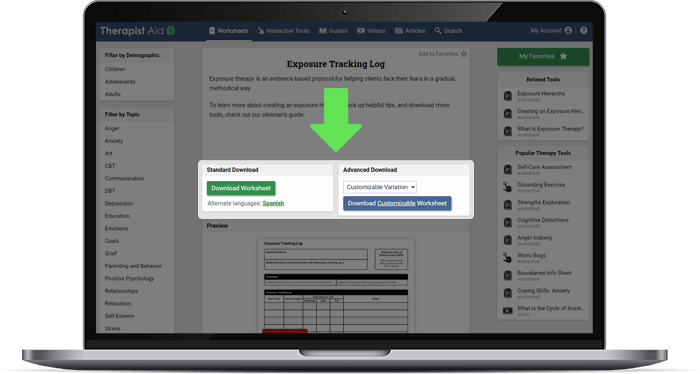
Using WorksheetsWorksheet landing pages include a brief description of the worksheet, a preview image, and download buttons. Free members can download a standard printable version of worksheets, while subscribers have access to advanced download options with customizable and fillable options.
How to download a standard worksheet:
- Navigate to the worksheet landing page of your choice.
- Press the green “Download” button. Depending on your device, you may see a download prompt, or the worksheet may open directly in your browser. If you have trouble at this stage, try right clicking (or long-pressing on mobile) the green download button, and saving the file to your device.
How to download a premium worksheet:
- Navigate to the worksheet landing page of your choice.
- Locate the “Advanced Download” section. This section will only appear if advanced downloads are available. If there are multiple advanced downloads, choose what you would like from the dropdown box.
- Press the blue “Download” button and review any further instructions in the popup window that appears.
- Press the green “Download” button within the popup window.
How to download a worksheet in a language other than English:
- Navigate to the worksheet landing page of your choice.
- If multiple language versions of a worksheet exist, they will be listed directly below the green “Download” button. Press the button for the language of your choice.
Having trouble downloading a worksheet?
Problems downloading worksheets are typically due to an out-of-date PDF reader. See our help article on installing a PDF reader for further assistance.
Was this article helpful?
Thank you for sharing your feedback. If you still need help, please contact us